

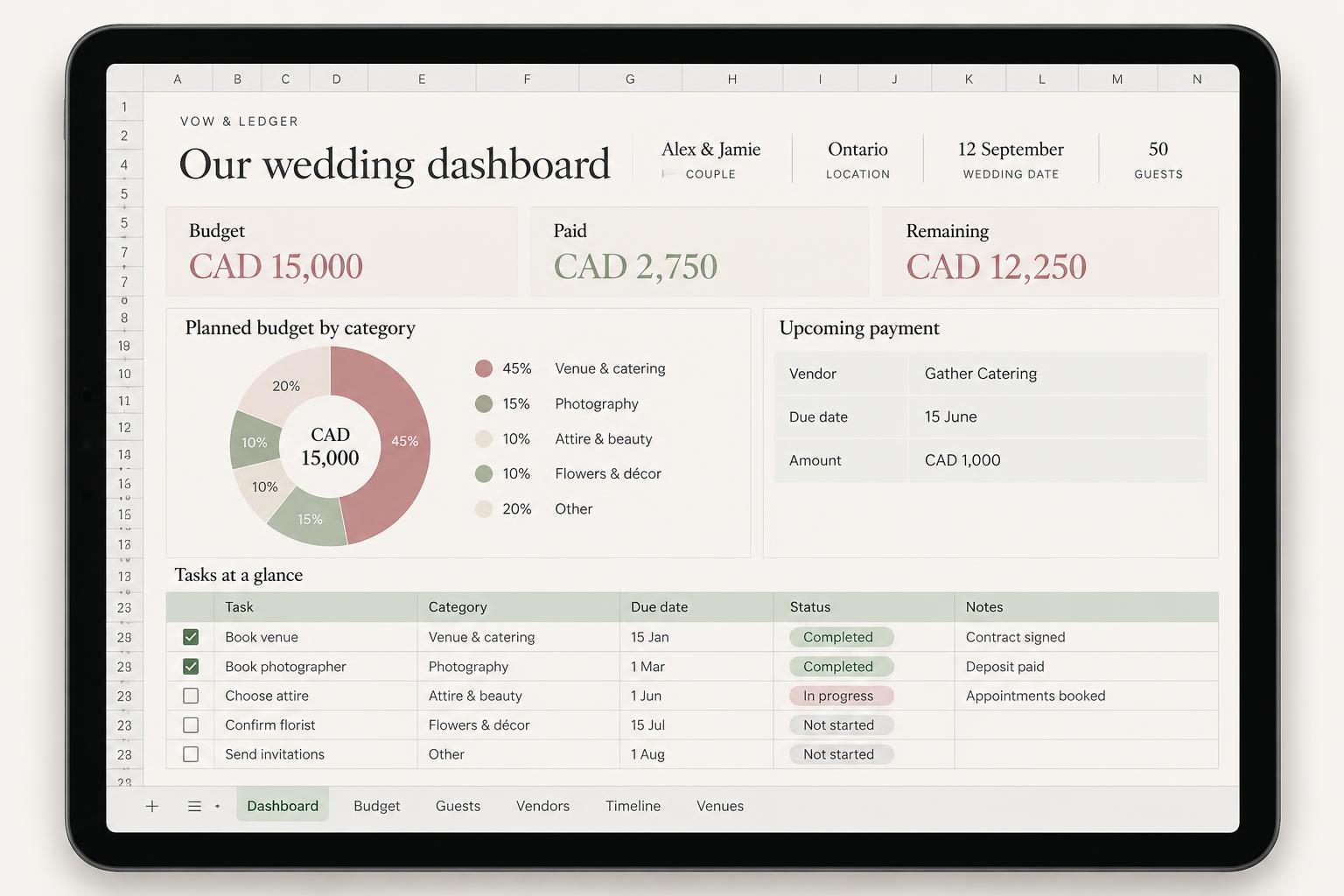
Dashboard
See your budget, paid deposits and next priorities together. One clear picture instead of another evening searching.
For your small wedding. And your peace of mind.
Bring your budget, guests, vendor quotes and payment dates together — so you can spend less time organising and more time looking forward to your day.
Digital wedding planner · Google Sheets & Excel · Prices in CAD
Made for Canadian celebrations of 20–80 guests.
Google Sheets & Excel · Setup guide & video tutorial included
A quick look inside
Inside Vow & Ledger
A thoughtful home for the numbers, names and decisions that make your wedding yours.
See your budget, paid deposits and next priorities together. One clear picture instead of another evening searching.
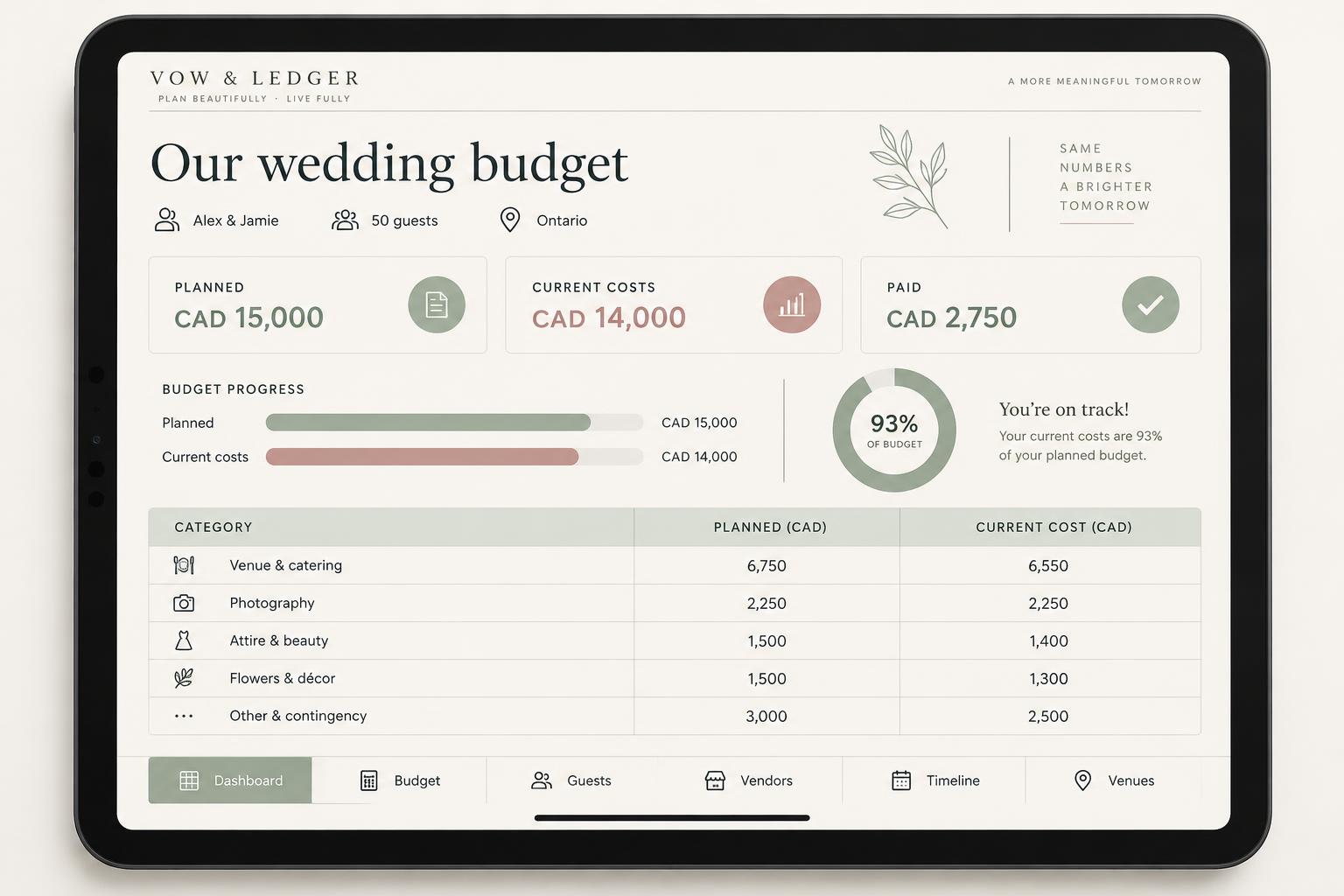
Set your allowances, record every expense and keep paid amounts beside the costs still ahead.
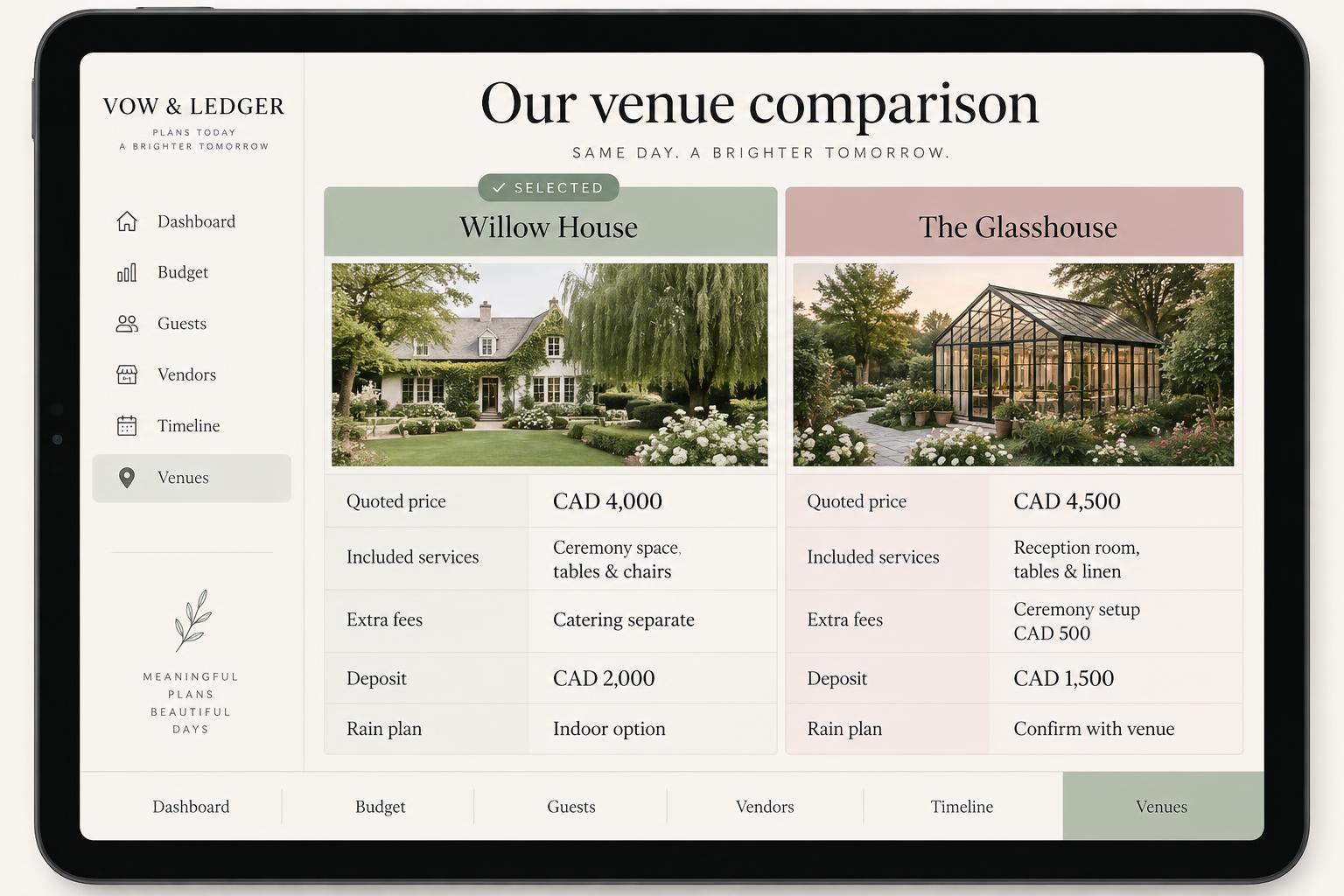
Put the price beside what’s included. Compare deposits, extra fees and practical details before choosing your place.
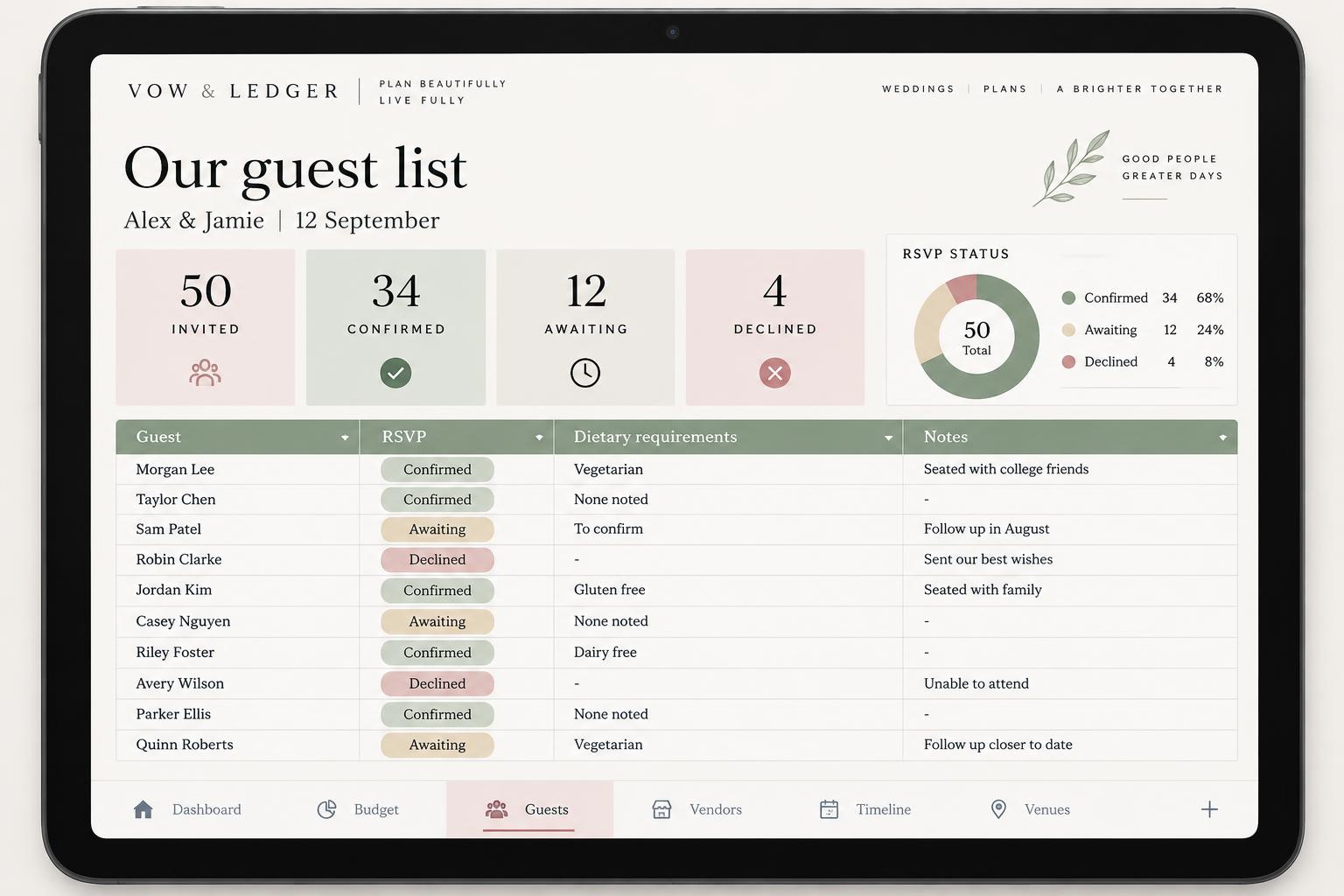
Keep invitations, replies and dietary requirements together — with a clear headcount for your venue and caterer.
Less admin. More anticipation.
Your budget, guest list and vendor decisions belong together. Keep the practical details organised without building a system from scratch.
See your planned spending, current costs and paid deposits separately. Make the next decision with the numbers in front of you.
Give the quotes, names and dates a home, so your planning conversations can move forward instead of starting over.

Wedding-specific planning tools, Google Sheets and Excel formats, a practical guide and a step-by-step tutorial. Make it your own.
Google Sheets & Excel · Setup guide & video tutorial included
Put a date and an owner beside each task. Keep deposits, deadlines and your wedding-day schedule where you can find them.
01
Start with your guest count, province and estimated wedding budget.
02
Add your vendors, quotes, deposits and payment dates.
03
See what has been paid, what remains and what needs attention next.
A little clarity for your plans
Explore an illustrative budget by guest count, style and priorities. Location changes estimated taxes, not starting vendor allowances.
Your estimate is an illustrative planning guide, not a vendor quote or guaranteed market price.
Step 1 of 4
Starting vendor allowances are identical across provinces and territories. Your location changes estimated taxes only. Results include those taxes and a separate 10% contingency; item-specific tax treatment must be confirmed with vendors.
No email required. Your estimate stays on this page and is not saved to an account.
The Complete Planner · CAD 89 · 12-month AI companion
Put two quotes beside your budget, and work through what to check before committing.
Example conversation
These conversations are scripted illustrations of the Complete companion. AI can make mistakes; it is not financial or legal advice. It does not update spreadsheets, contact vendors, book services, make payments or access external accounts.
Included in both planners
Choose the support that feels right for your planning journey.
CAD 71.25
CAD 57
One-time payment
Track your wedding budget, vendor quotes, guest list and payment dates with a planner for Google Sheets and Excel.
Your complete organisation system
CAD 111.25
CAD 89
One-time payment
Everything in Essential, plus 12 months of AI planning support from your first message.
Comparing two catering quotes? Ask what to check about service charges, rentals and deposits before you book.
Your complete organisation system
Plus your planning companion
Prices in CAD. Applicable taxes confirmed at checkout.
Complete includes everything in Essential. The companion is what changes: someone to think through the decisions with you, who remembers your wedding between conversations.
| Included in your plan | EssentialCAD 57 | CompleteCAD 89 |
|---|---|---|
| Core planning tools | ||
| Wedding financial dashboard | ||
| Personalised wedding budget | ||
| Wedding timeline | ||
| Task management and deadlines | ||
| Wedding day schedule | ||
| Financial management | ||
| Expense and spending tracker | ||
| Deposit and payment tracking | ||
| Provincial tax considerations | ||
| Guest management | ||
| Guest management | ||
| RSVP tracking | ||
| Dietary requirements | ||
| Vendor management | ||
| Vendor management | ||
| Vendor quotation comparison | ||
| Venue comparison | ||
| Formats & guides | ||
| Google Sheets version | ||
| Excel version | ||
| Practical setup guide | ||
| Step-by-step video tutorial | ||
| AI planning companion | ||
| Personal wedding planning AI assistant | ||
| Persistent wedding-specific memory for 12 months | ||
| Saved conversation history | ||
| Context continuity across sessions and devices | ||
| Personalised wedding budget analysis | ||
| Intelligent vendor quotation comparisons | ||
| Help identifying differences between vendor offers | ||
| Upcoming payment and deposit analysis | ||
| Personalised planning priorities | ||
| Budget trade-off recommendations | ||
| Guidance as guest counts and wedding decisions change | ||
| Contextual assistance throughout the planning journey | ||
14-day money-back guarantee. If Vow & Ledger is not right for you, request a refund within 14 days of purchase.
Refund requests follow the terms shown for your purchase.
A digital wedding planning system designed for Canadian celebrations of approximately 20–80 guests, with an optional AI companion. It is not a wedding planning agency.
Yes. No physical product is shipped.
Both formats are included in the plan. Use the spreadsheet app you prefer; the website does not automatically sync your files.
You can browse this site on your phone. Spreadsheet viewing and editing depend on your Google Sheets or Excel app; no specific mobile-file compatibility is promised here.
The setup guide and step-by-step video tutorial are intended to help you get started.
All 18 planning tools and resources. The complete comparison above lists each inclusion.
Everything in Essential plus the AI planning companion, saved wedding details, conversation history and 12 months of access.
Sign in with your purchase email, save your wedding details and ask a planning question. It uses those details and up to six recent messages from the current conversation. The limit is 20 messages per UTC day, with up to 1,000 characters per question. It cannot edit spreadsheets, contact vendors, book or pay, and is not professional advice.
Your first message activates 12 months of companion access, not your purchase date. Saved wedding details carry into future conversations; complete chat history is not automatically recalled. After expiry, history remains readable while your purchase access is active.
Submitted quiz answers are stored. Saved wedding details and conversations are account-linked; AI requests use third-party processing. You can delete saved details and conversations in your account. See the privacy policy for the data flow.
Follow the delivery and access instructions provided with your purchase after payment confirmation. Use your checkout email for customer sign-in.
Yes. Essential is CAD 57 and Complete is CAD 89.
Plan prices exclude any applicable checkout taxes; The final total is confirmed at checkout before payment. The estimator is separate: its result includes estimated vendor taxes and contingency.
See the delivery and refund section above. Request refunds through the options in your purchase email or account, under the terms for your purchase.
Privacy & your data
Your planning information is handled differently from your payment details.
Support
Leave a question about choosing your planner, purchase access or getting started.
Your request is saved for review, not emailed. Please don’t include payment card details.
Vow & Ledger
A thoughtful place for the practical details. A little more room for the wedding you want.
Choose my planner